MCP Integration
Use GNO as an MCP server for AI assistants like Claude Desktop, Cursor, and others.
Full specification: See spec/mcp.md for complete tool and resource schemas.
Overview
MCP (Model Context Protocol) allows AI assistants to access external tools and resources. GNO provides:
- Tools (read): gno_search, gno_vsearch, gno_query, gno_get, gno_multi_get, gno_status, gno_list_tags, gno_links, gno_backlinks, gno_similar, gno_graph
- Tools (write, opt-in): gno_capture, gno_add_collection, gno_sync, gno_embed, gno_index, gno_remove_collection
- Tools (jobs): gno_job_status, gno_list_jobs
- Resources: Access documents via
gno://collection/path
Design: Retrieval-Focused
GNO’s MCP tools are retrieval-focused. The MCP server returns search results and document content; the client LLM synthesizes answers. Write tools enable collection management but do not perform answer synthesis.
Why? Claude, Codex, and other AI agents use much more powerful models. Having GNO call a separate (likely smaller) LLM to synthesize answers would be:
- Slower (extra LLM call)
- Lower quality (local models < Claude/GPT-4)
- Redundant (the client LLM can synthesize directly)
Intended workflow:
- Client LLM uses
gno_queryto retrieve relevant documents - Client LLM synthesizes the answer from retrieved context
- Result: Best retrieval (GNO) + best synthesis (Claude/Codex)
Security Model
Write Tool Gating
Write tools are disabled by default. Enable with:
gno mcp --enable-write
# or
GNO_MCP_ENABLE_WRITE=1 gno mcp
Without this flag, only read-only tools are available.
Collection Root Validation
gno_add_collection rejects dangerous paths:
/(root filesystem)~alone (entire home directory)- System directories (
/etc,/usr,/bin,/var,/System,/Library) - Hidden config dirs (
~/.config,~/.local,~/.ssh,~/.gnupg)
Client Approval
MCP clients prompt for tool approval. Review parameters before confirming write operations.
Job Session Lifetime
Jobs are stored in memory and tied to the MCP server process:
- Job IDs are only valid within the same running server
- Polling after server restart returns NOT_FOUND
- Different MCP processes cannot query each other’s jobs
Quick Install
Use the CLI to install GNO as an MCP server:
# Read-only (default)
gno mcp install                           # Claude Desktop (default)
gno mcp install --target cursor           # Cursor
gno mcp install --target zed              # Zed
gno mcp install --target windsurf         # Windsurf
gno mcp install --target opencode         # OpenCode
gno mcp install --target amp              # Amp
gno mcp install --target lmstudio         # LM Studio
gno mcp install --target librechat        # LibreChat
gno mcp install --target claude-code      # Claude Code CLI
gno mcp install --target codex            # OpenAI Codex CLI
# Write-enabled
gno mcp install --enable-write                    # Claude Desktop (default)
gno mcp install --target cursor --enable-write    # Cursor
gno mcp install --target raycast --enable-write   # Raycast (if supported)
⚠️ Write-enabled mode allows AI to create documents, add collections, and trigger reindexing. Review tool calls before approving.
Scope Options
Some clients support project-level configuration:
gno mcp install --target cursor --scope project     # .cursor/mcp.json
gno mcp install --target opencode --scope project   # opencode.json
gno mcp install --target librechat --scope project  # librechat.yaml
Other Commands
gno mcp status                  # Show installation status for all targets
gno mcp uninstall --target X    # Remove GNO from a target
Supported Clients
| Client | Install Command | Scope |
|---|---|---|
| Claude Desktop | gno mcp install |
User |
| Claude Code | gno mcp install --target claude-code |
User, Project |
| Cursor | gno mcp install --target cursor |
User, Project |
| Zed | gno mcp install --target zed |
User |
| Windsurf | gno mcp install --target windsurf |
User |
| OpenCode | gno mcp install --target opencode |
User, Project |
| Amp | gno mcp install --target amp |
User |
| LM Studio | gno mcp install --target lmstudio |
User |
| LibreChat | gno mcp install --target librechat |
Project |
| Codex | gno mcp install --target codex |
User, Project |
Note: Warp terminal requires manual UI configuration. See Warp MCP docs.
Raycast AI Integration
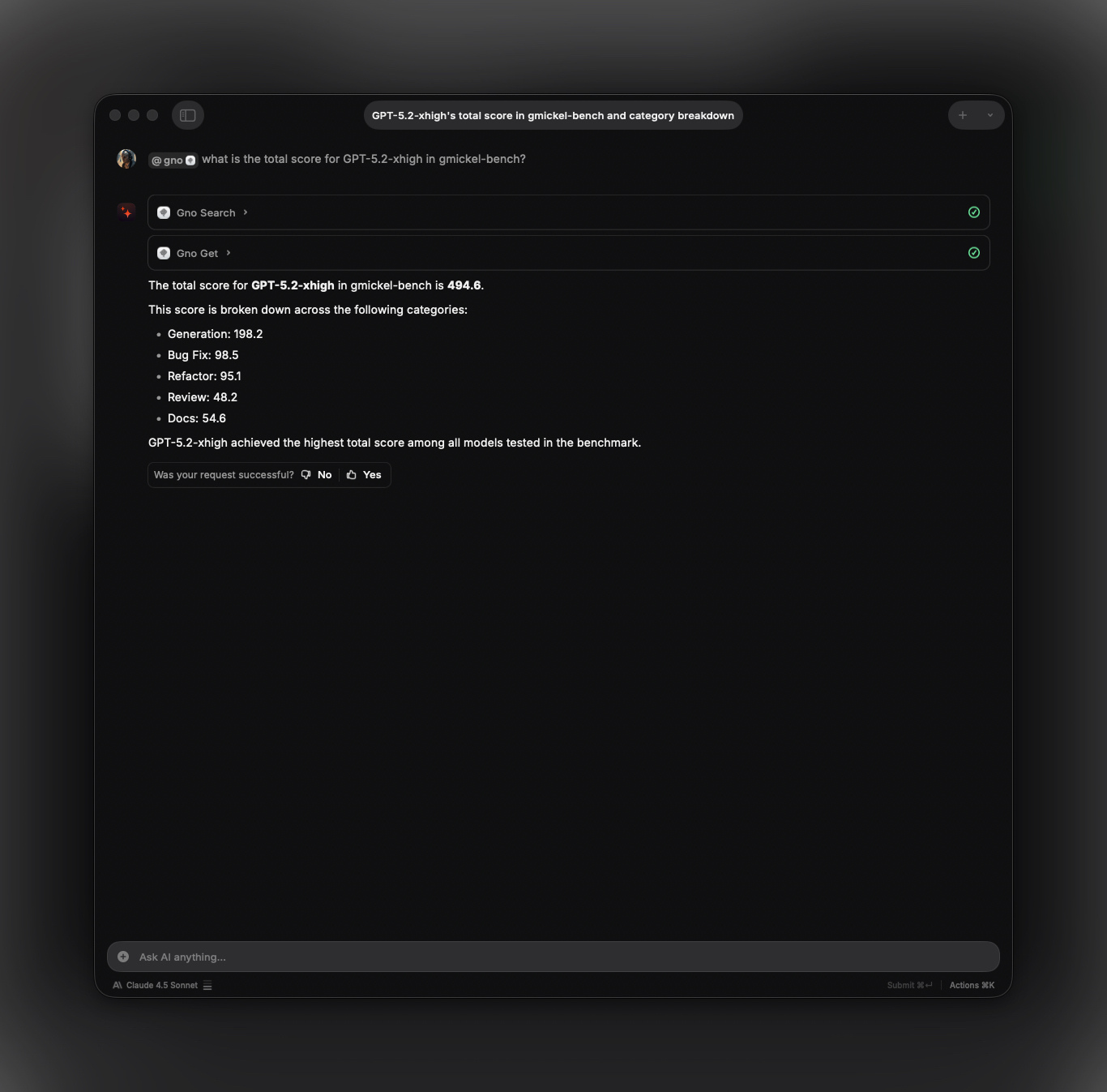
Use GNO directly in Raycast AI with @gno mentions. Works in both Quick AI and AI Chat.
Requires: Raycast Pro subscription (for AI features), or 50 free messages for non-Pro users
Docs: Raycast AI · MCP Support
Setup
Option 1: Clipboard Auto-Fill
Copy this JSON, then open Raycast → “Install MCP Server”. Raycast auto-fills from clipboard.
Read-only:
{
  "mcpServers": {
    "gno": {
      "command": "gno",
      "args": ["mcp"]
    }
  }
}
Write-enabled:
{
  "mcpServers": {
    "gno": {
      "command": "gno",
      "args": ["mcp", "--enable-write"]
    }
  }
}
Option 2: Manual UI
- Open Raycast → Search “Install MCP Server”
- Configure:
- Name:
gno - Command:
gno - Arguments:
mcp(read-only) ormcp,--enable-write(write-enabled)
- Name:
Where to Use GNO
Once installed, @gno works anywhere in Raycast AI:
| Mode | Access | Best For |
|---|---|---|
| Quick AI | Press Tab in Raycast, or assign hotkey | Fast one-off queries, floating overlay |
| AI Chat | Search “AI Chat” or assign hotkey (e.g., ⌥J) | Extended research, conversation history |
| AI Commands | Custom commands with @gno |
Repeatable workflows |
Quick AI appears as a floating window above your apps, ideal for quick lookups:
@gno what's in my notes about TypeScript generics?
AI Chat is a full window with sidebar and history, better for research sessions:
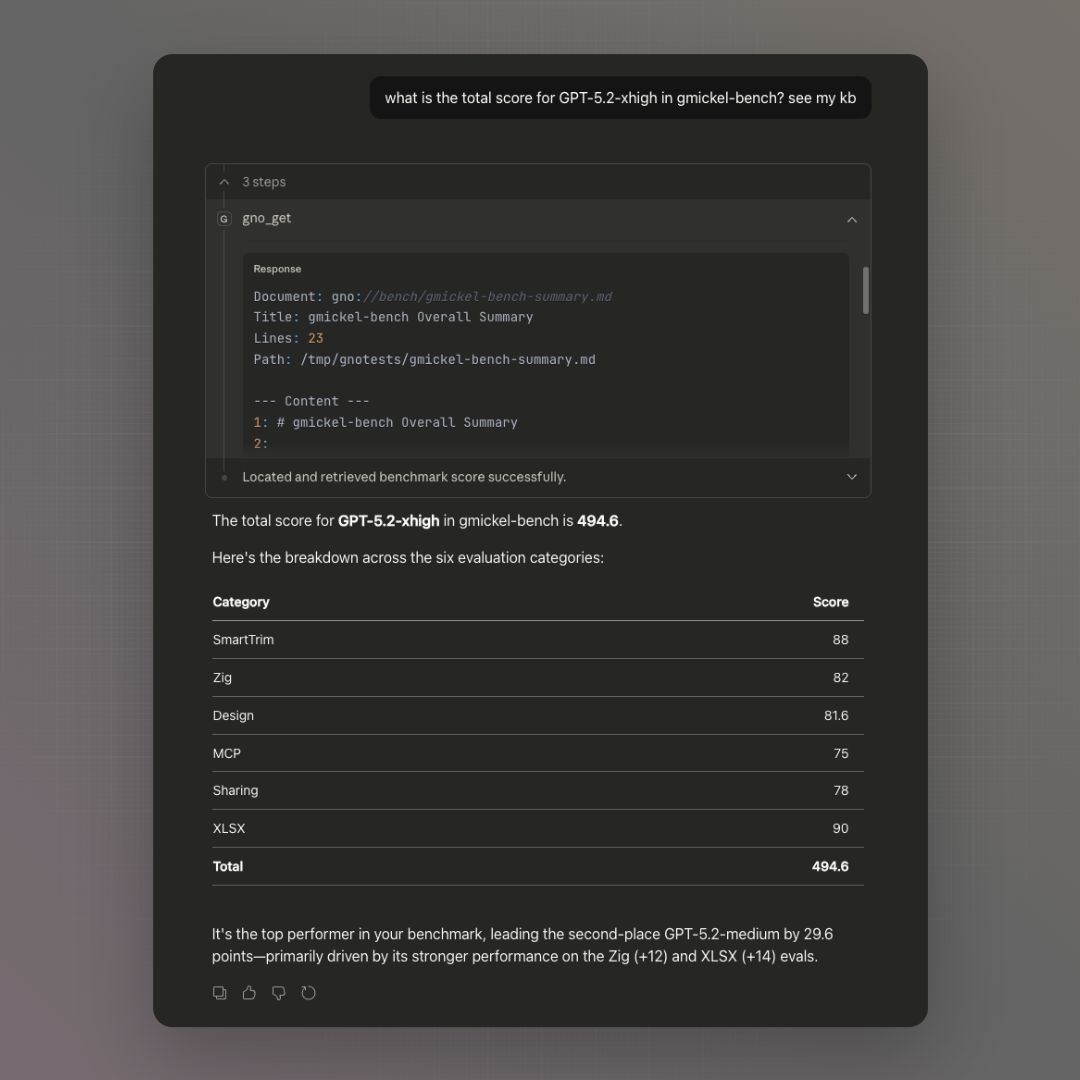
@gno which model scored highest on gmickel-bench
The AI will call GNO tools (gno_query, gno_get) and synthesize answers from your documents.
Example Queries
@gno search for notes about authentication
@gno what documents mention API design?
@gno how many collections do I have?
@gno find my meeting notes from last week
@gno get the contents of my project README
Write examples (requires write-enabled mode):
@gno create a note about todays meeting
@gno add my ~/Projects/docs folder
@gno refresh the notes collection
Search depth: ask for faster or more thorough searches:
@gno quick search for TypeScript errors          # fast mode (~0.7s)
@gno do a thorough search for auth vulnerabilities  # thorough mode (~5-8s)
The AI will pass fast: true or thorough: true to gno_query based on your request. Default mode balances speed and quality (~2-3s).
Model Quality Matters
Recommended: Claude Haiku 4.5+, Sonnet 4.5+, or GPT-4+. Raycast’s Auto model selection also works well.
Smaller/weaker models may:
- Hallucinate collection names (e.g.,
collection: gnoinstead of*) - Use incorrect parameter values
- Fail to call the right tools
Requirements
- GNO installed and in PATH
- At least one collection indexed (
gno add <path>) gno serveNOT required (MCP uses stdio, accesses SQLite directly)- Restart Raycast after PATH changes
Manual Configuration
Claude Desktop
Add to ~/Library/Application Support/Claude/claude_desktop_config.json:
Read-only:
{
  "mcpServers": {
    "gno": {
      "command": "gno",
      "args": ["mcp"]
    }
  }
}
Write-enabled:
{
  "mcpServers": {
    "gno": {
      "command": "gno",
      "args": ["mcp", "--enable-write"]
    }
  }
}
Cursor
Add to ~/.cursor/mcp.json:
Read-only:
{
  "mcpServers": {
    "gno": {
      "command": "gno",
      "args": ["mcp"]
    }
  }
}
Write-enabled:
{
  "mcpServers": {
    "gno": {
      "command": "gno",
      "args": ["mcp", "--enable-write"]
    }
  }
}
Zed
Add to ~/.config/zed/settings.json:
Read-only:
{
  "context_servers": {
    "gno": {
      "command": "gno",
      "args": ["mcp"]
    }
  }
}
Write-enabled:
{
  "context_servers": {
    "gno": {
      "command": "gno",
      "args": ["mcp", "--enable-write"]
    }
  }
}
Windsurf
Add to ~/.codeium/windsurf/mcp_config.json:
Read-only:
{
  "mcpServers": {
    "gno": {
      "command": "gno",
      "args": ["mcp"]
    }
  }
}
Write-enabled:
{
  "mcpServers": {
    "gno": {
      "command": "gno",
      "args": ["mcp", "--enable-write"]
    }
  }
}
OpenCode
Add to ~/.config/opencode/config.json:
Read-only:
{
  "mcp": {
    "gno": {
      "type": "local",
      "command": ["gno", "mcp"],
      "enabled": true
    }
  }
}
Write-enabled:
{
  "mcp": {
    "gno": {
      "type": "local",
      "command": ["gno", "mcp", "--enable-write"],
      "enabled": true
    }
  }
}
Amp
Add to ~/.config/amp/settings.json:
Read-only:
{
  "amp.mcpServers": {
    "gno": {
      "command": "gno",
      "args": ["mcp"]
    }
  }
}
Write-enabled:
{
  "amp.mcpServers": {
    "gno": {
      "command": "gno",
      "args": ["mcp", "--enable-write"]
    }
  }
}
LM Studio
Add to ~/.lmstudio/mcp.json:
Read-only:
{
  "mcpServers": {
    "gno": {
      "command": "gno",
      "args": ["mcp"]
    }
  }
}
Write-enabled:
{
  "mcpServers": {
    "gno": {
      "command": "gno",
      "args": ["mcp", "--enable-write"]
    }
  }
}
LibreChat
Add to librechat.yaml in your LibreChat project root:
Read-only:
mcpServers:
  gno:
    command: gno
    args:
      - mcp
Write-enabled:
mcpServers:
  gno:
    command: gno
    args:
      - mcp
      - --enable-write
Other MCP Clients
Any MCP-compatible client can connect:
# Start MCP server manually (for debugging)
gno mcp
The server uses stdio transport (JSON-RPC 2.0 over stdin/stdout).
Available Tools
gno_search
BM25 keyword search.
Query: "authentication"
Collection: (optional)
since: "last month"         # Optional temporal lower bound
until: "today"              # Optional temporal upper bound
categories: ["meeting"]     # Optional category/content-type filters
author: "gordon"            # Optional author contains filter
tagsAll: ["backend"]        # Optional: must have ALL tags
tagsAny: ["urgent"]         # Optional: must have ANY tag
Limit: 5 (default)
gno_vsearch
Vector semantic search.
Query: "how to handle errors gracefully"
since: "2025-01-01"
until: "today"
categories: ["notes", "code"]
author: "gordon"
gno_query
Hybrid search (BM25 + vector).
Query: "database optimization"
intent: "postgres query latency and indexing"
candidateLimit: 12
exclude: ["hiring", "reviews"]
since: "last month"
until: "today"
categories: ["backend", "notes"]
author: "gordon"
tagsAll: ["backend", "work"]   # Optional: must have ALL tags
tagsAny: ["urgent", "priority"]  # Optional: must have ANY tag
queryModes:
  - { mode: "term", text: "\"refresh token\" -oauth1" }
  - { mode: "intent", text: "how token rotation is implemented" }
  - { mode: "hyde", text: "Refresh tokens rotate on each use and old tokens are invalidated." }
Search modes (via parameters):
- Default: Preset-aware balanced mode. On
slim/slim-tuned, expansion + reranking; on larger presets, reranking only by default (~2-3s) fast: true: Skip both expansion and reranking (~0.7s)thorough: true: Expansion + wider rerank pool (~5-8s)
Agent retry strategy: Use default mode first. If no relevant results:
- Rephrase the query (free, often effective)
- Then try
thorough: truefor better recall
Recency intent (latest, newest, recent) sorts results newest-first by canonical frontmatter date when present, with file modified time as fallback.
When queryModes is provided, GNO uses those entries directly:
term: BM25-focused phrase/keyword queryintent: semantic/vector-focused reformulationhyde: hypothetical passage for vector retrieval- Validation:
textis trimmed and must be non-empty; at most onehydeentry is allowed
Optional steering controls:
intent: disambiguating context for ambiguous queries. It steers expansion, reranking, and snippet selection without being searched directly.candidateLimit: max candidates sent to reranking. Lower it for faster responses on CPU-heavy or low-memory setups.exclude: hard-prune docs containing any excluded term in title/path/body.
Migration notes (retrieval v2):
- Existing
gno_querycalls remain valid with no payload changes required. intentis complementary toqueryModes: use intent for background context,queryModesfor caller-supplied lexical/semantic expansions.queryModesis optional and only needed when your client wants explicit retrieval intent control.- If
queryModesis set, generated expansion is skipped for that query and the provided entries are used directly. - The
querystring itself may also be a multi-line structured query document usingterm:,intent:, andhyde:lines. See Structured Query Syntax.
# Existing payload (still valid)
query: "auth flow"
thorough: true

# Retrieval v2 payload (explicit intent control)
query: "auth flow"
queryModes:
  - { mode: "term", text: "\"refresh token\" -oauth1" }
  - { mode: "intent", text: "how token rotation is implemented" }
  - { mode: "hyde", text: "Refresh tokens rotate on each use and old tokens are revoked." }

# Or put the structure directly into the query field:
query: |
  auth flow
  term: "refresh token" -oauth1
  intent: how token rotation is implemented
gno_get
Retrieve document by ID.
ref: "abc123def456"
The response includes source metadata such as absPath, sourceHash, MIME/ext, and document capability metadata so clients can distinguish editable source files from read-only converted documents.
gno_multi_get
Retrieve multiple documents.
refs: ["abc123", "def456"]
gno_status
Check index health.
Returns collection counts, document totals, and health status.
gno_capture
Create a new document (requires --enable-write).
gno_add_collection
Add a folder to the index (requires --enable-write).
gno_sync
Reindex one or all collections (requires --enable-write). FTS sync only (no embedding).
gno_embed
Generate embeddings for unembedded chunks (requires --enable-write). Runs as background job.
Poll job status with gno_job_status. Fails fast if embedding model not cached.
gno_index
Full index: sync files + generate embeddings (requires --enable-write). Runs as background job.
collection: "notes"  # Optional: limit to one collection
gitPull: false       # Optional: run git pull before sync
Equivalent to CLI gno index. Runs sync then embed as single job.
gno_remove_collection
Remove a collection from config (requires --enable-write). Indexed data is retained.
gno_job_status
Check async job status.
gno_list_jobs
List active and recent jobs.
gno_list_tags
List all tags with document counts.
collection: "notes"  # Optional: filter by collection
prefix: "project"    # Optional: filter by tag prefix
Returns tags with counts for faceted filtering.
gno_links
Get outgoing links from a document.
ref: "notes/readme.md"  # Document reference (URI, collection/path, or #docid)
type: "wiki"            # Optional: filter by link type ("wiki" or "markdown")
Returns all outgoing links from the document, including wiki links ([[Target]]) and markdown links ([text](path.md)).
gno_backlinks
Get documents that link TO this document.
ref: "notes/target.md"    # Target document reference
collection: "notes"       # Optional: filter source documents by collection
Returns all documents that reference the target document. Useful for discovering related content and navigating document graphs.
gno_similar
Find semantically similar documents using vector embeddings.
ref: "notes/readme.md"     # Source document reference
limit: 5                   # Max results (1-50, default: 5)
threshold: 0.7             # Min similarity score (0-1)
crossCollection: false     # Include docs from other collections (default: false)
Uses document embeddings to find semantically related content. The algorithm:
- Retrieves embeddings for all chunks of the source document
- Computes the average embedding
- Searches for nearest neighbors using sqlite-vec
- Returns top N similar documents (excluding the source itself)
Note: Requires documents to be embedded (gno embed or gno index). Vector search must be available (sqlite-vec installed).
gno_graph
Get knowledge graph of document connections (nodes and edges).
collection: "notes"        # Optional: filter to single collection
limit: 2000                # Max nodes (1-5000, default: 2000)
edgeLimit: 10000           # Max edges (1-50000, default: 10000)
includeSimilar: false      # Include similarity edges (default: false)
threshold: 0.7             # Similarity threshold (0-1, default: 0.7)
linkedOnly: true           # Exclude isolated nodes (default: true)
similarTopK: 5             # Similar docs per node (1-20, default: 5)
Returns graph data with nodes (documents) and links (edges). Edge types: wiki, markdown, similar.
Use cases:
- Explore document relationships programmatically
- Build custom visualizations
- Analyze knowledge graph structure
- Find highly connected “hub” documents
Resources
Access documents via GNO URIs:
gno://notes/projects/readme.md
gno://work/src/main.ts
Resource format:
gno://<collection>/<relative-path>
Clarifications
- MCP loads embedding/rerank models for search tools
- MCP does NOT do answer synthesis
- Collection names are case-insensitive
- Search tools support
tagsAll/tagsAnyfor filtering
Usage Patterns
Searching Your Notes
Ask the AI assistant:
“Search my notes for meeting decisions from last week”
The assistant will use gno_search or gno_query to find relevant documents.
Getting Document Content
Ask:
“Get the contents of my project README”
The assistant uses gno_get with the docid from search results.
Research Workflow
- Search: “Find documents about API authentication”
- Review results and scores
- Get full content of relevant docs
- Ask follow-up questions with context
Environment Variables
Configure MCP server behavior with environment variables:
| Variable | Effect |
|---|---|
HF_HUB_OFFLINE=1 |
Offline mode: use cached models only, fail if missing |
GNO_NO_AUTO_DOWNLOAD=1 |
Disable auto-download but allow explicit gno models pull |
GNO_VERBOSE=1 |
Enable verbose logging |
Models auto-download on first use. Use these variables in CI/air-gapped environments.
Troubleshooting
“Tool not found”
Ensure GNO is installed globally:
bun install -g @gmickel/gno
which gno  # Should show path
“No results”
Check that documents are indexed:
gno ls
gno status
Connection Issues
Verify MCP server works:
echo '{"jsonrpc":"2.0","id":1,"method":"initialize","params":{}}' | gno mcp
Should return a valid JSON-RPC response.
Debug Mode
Enable verbose logging:
GNO_VERBOSE=1 gno mcp
Performance Tips
- Index only what you need (use
--patternfilters) - Use specific collections for faster searches
- Pre-download models:
gno models pull --all